Credit Risk Scoring Guide: How to Assess Creditworthiness in 3 Minutes with AI
Upload a bank statement, set your risk policy with a slider, and receive an AI-generated credit score together with a downloadable PDF report. No code. No spreadsheets. Full audit trail.

Northhaven Analytics is a platform for automated credit risk assessment powered by bank statement analysis. Our AI engine reads transaction history, classifies every entry, and generates a comprehensive risk profile along with a numerical score within seconds. You do not need to understand the mathematics behind the model — this guide will walk you through exactly how to operate the platform, what to click, and how to interpret every result on screen.
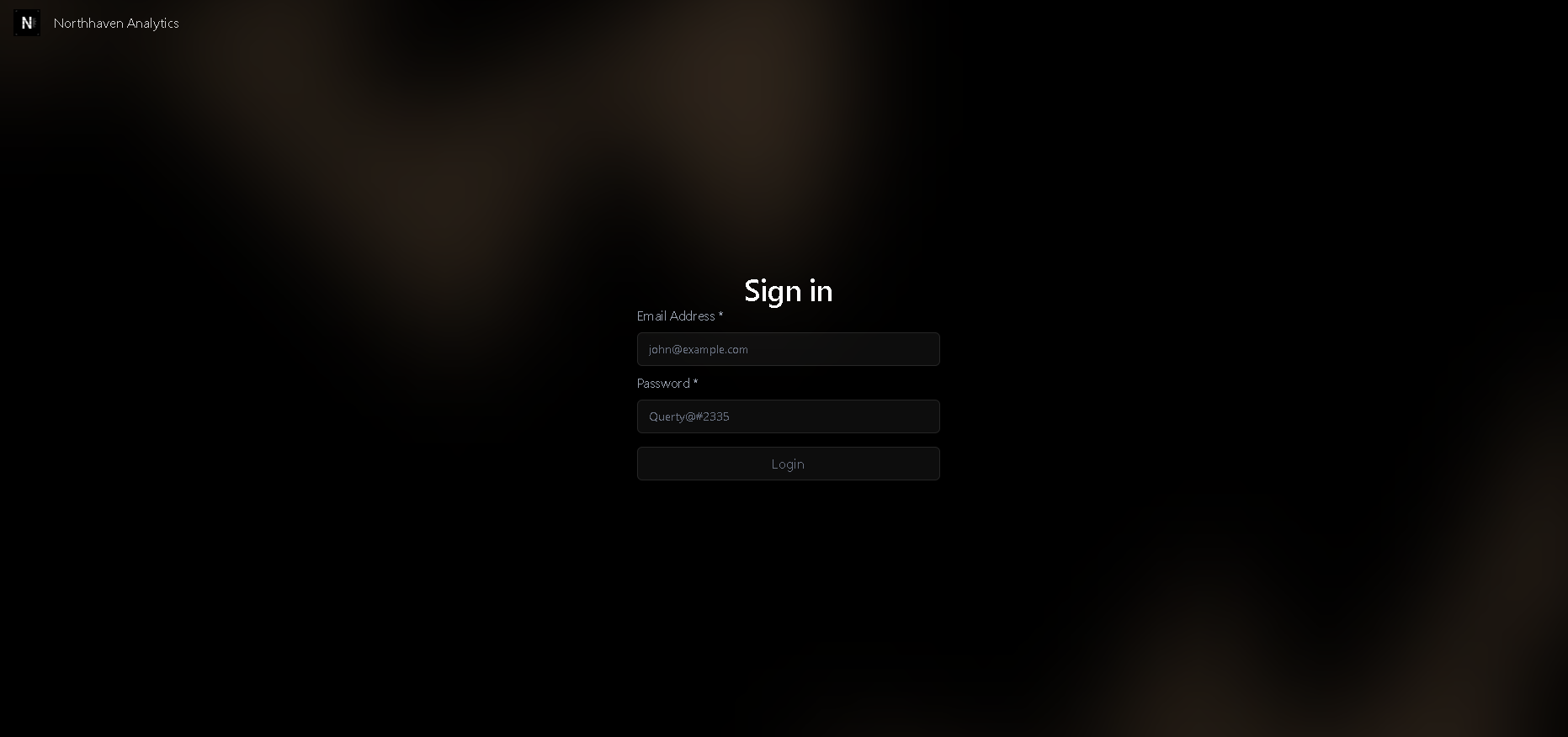
Logging Into the Platform
The Northhaven Analytics platform is available exclusively to registered users. To gain access you need an email address and password — your account credentials are provided after purchasing a subscription.
Do not share your login credentials with third parties. Every session is tied to your account. All uploaded bank statements are processed within an isolated session on our servers and are not stored after the analysis is complete.
Uploading a Bank Statement
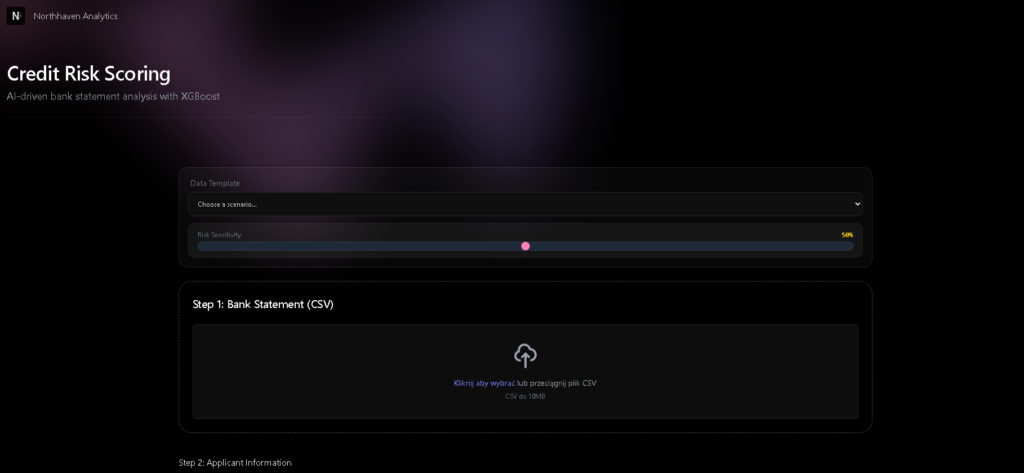
After logging in you will see the main Credit Risk Scoring screen with the headline "AI-driven bank statement analysis with XGBoost". This is where the entire process begins. At the top you can either select a pre-built data template or upload your own file.
The Risk Sensitivity Slider — What Is It?
Before uploading a file, pay attention to the Risk Sensitivity slider — set to 50% by default. This is the global sensitivity threshold for the entire analysis. The higher the percentage, the more rigorous the assessment — the system will reject applicant profiles that would have passed at a lower threshold.
70–80% — for higher-risk applicants (short-term loans, high leverage, limited credit history).
50% — for standard credit applications. This is the recommended default.
30–40% — for VIP or premium products with a low-risk target customer profile.
How to Prepare Your CSV File
The platform accepts bank statements in CSV format up to 10 MB. You can drag-and-drop a file onto the upload area or click to select it from your drive. The system automatically recognises formats exported by most major banks:
| Bank | How to Export a CSV Statement | Compatibility |
|---|---|---|
| HSBC | My Banking → Statements → Download → CSV | Full |
| Barclays | Account details → Download transactions → CSV | Full |
| Revolut | Account → Statements → CSV export | Full |
| Monzo | Account → Export transactions → CSV | Full |
| Santander | My Account → Transaction history → Export CSV | Full |
| NatWest / RBS | Statements → Download → Spreadsheet (CSV) | Check delimiter |
| Starling Bank | Account → Download CSV (via app or web) | Full |
For best results upload a statement covering the last 3–12 months. The minimum is 1 complete calendar month. The more months included, the more reliable the assessment of income regularity and spending patterns.
Applicant Information
Below the file upload area you will find the Step 2: Applicant Information section. This is where you enter the basic contextual data about the applicant. This information is combined with the data extracted from the bank statement to produce a complete risk profile.
Once the form is complete, click Confirm — the section will be locked and you can proceed to Step 3.
Configuring Your Risk Policy
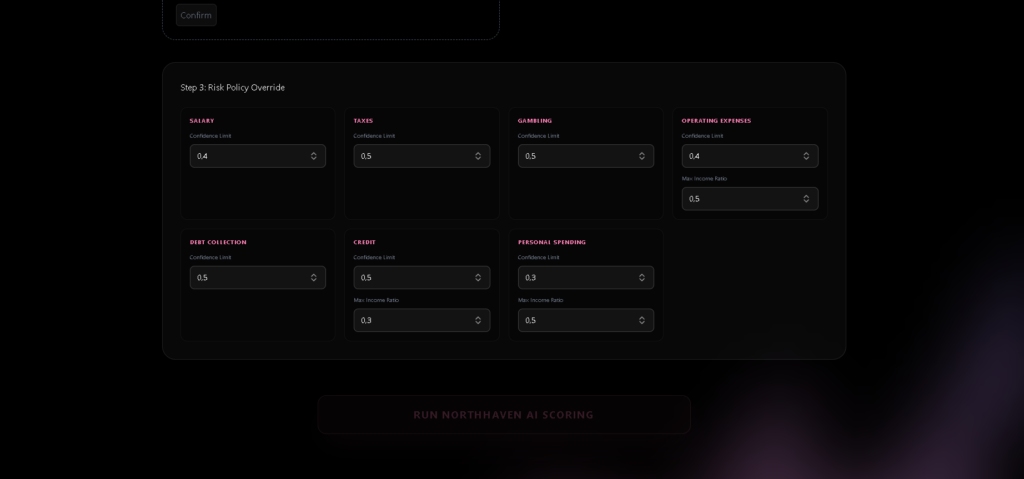
The Step 3: Risk Policy Override section is the heart of the platform — and the core advantage of Northhaven Analytics over other credit assessment tools. Here you have full control over how rigorously the system evaluates each category of spending. You can adapt the parameters to your specific credit policy without writing a single line of code.
What Do the Policy Fields Control?
| Parameter | What It Controls | Default Value |
|---|---|---|
Confidence Limit | Minimum AI confidence required to classify a transaction into a given category. Higher values mean more conservative classification — ambiguous transactions will not be counted toward the category. | 0.3 – 0.5 |
Max Income Ratio | Maximum allowable share of a given expense category relative to monthly income. For example 0.30 means a category may not exceed 30% of declared income. | 0.1 – 0.5 |
Pre-Built Policy Profiles
The Gambling and Debt Collection categories carry a zero-tolerance limit — any transaction classified into either category automatically triggers a negative verdict. This is intentional system behaviour. Never raise these limits above zero unless you have an exceptional, documented business justification for doing so.
Once your risk policy is configured, press the large RUN NORTHHAVEN AI SCORING button. The analysis typically completes within a few seconds to under a minute depending on statement size.
Interpreting the AI Score
When the analysis finishes you will see the Analysis Intelligence panel displaying a comprehensive risk profile. Here is how to read every element on that screen.
The Verdict — APPROVED vs POLICY REJECTED
All configured policy rules have been satisfied. Regular income detected, no gambling or debt-collection transactions, DTI within limits, and the AI score exceeds the Risk Sensitivity threshold.
At least one policy rule has been violated. The specific reason for rejection is shown in the AI Expert Insight section directly below the metrics panel.
AI Expert Insight — The Engine's Commentary
Below the metrics you will find the AI Expert Insight field containing an automatically generated explanation of the decision. You can use this text directly as the stated rationale for a credit decision in your documentation or compliance records.
Downloading the PDF Report
At the bottom of the results screen you will find the DOWNLOAD INTELLIGENCE REPORT (PDF) button. Clicking it generates and immediately downloads the complete analysis report — ready to print, archive, or send to a client.
We recommend saving PDF reports in a dedicated folder labelled with the date and client identifier. The platform does not retain analysis history after the session ends — the downloaded PDF is your only copy of the results.
To run a new analysis, click the RESET button in the lower-right corner of the screen. The platform returns to its initial state and you can upload a new file.
What Exactly Does the AI Engine Detect?
The Northhaven AI engine automatically classifies every transaction from the uploaded bank statement into one of seven categories. It operates in two stages: first it checks a curated list of known keywords; transactions not matched by the keyword layer are then analysed by a language model using sentence embeddings to capture semantic meaning.
| Category | What It Captures | Impact on Score |
|---|---|---|
Salary | Employer payroll, freelance invoices, B2B fees, dividends, honoraria | Positive |
Taxes | National Insurance, income tax, VAT payments, HMRC transfers | Neutral |
Credit | Loan instalments, leasing payments, BNPL (Klarna, Clearpay, PayPal Credit) | Monitored — 30% DTI limit |
Operating Expenses | Office rent, Google Ads, SaaS subscriptions, hosting, professional services | Neutral — up to 50% |
Personal Spending | Groceries, Netflix, Spotify, restaurants, gym, pharmacy | Monitored — 10% limit |
Gambling | Betting platforms (Bet365, Betfair, Paddy Power), online casinos, lottery | Critical — zero tolerance |
Debt Collection | Bailiff payments, debt recovery agencies, enforcement orders, court-mandated transfers | Disqualifying |
The engine does not look for exact keyword matches — it understands semantic context. "Digital advertising campaign Mar-25 GOOGLE ADS" will be correctly classified as an Operating Expense. "TOYOTA FINANCIAL SERVICES Monthly lease" will be assigned to Credit even if the exact wording differs from the system's keyword dictionary. Ambiguous entries are handled by the embedding model, which compares each transaction description to the meaning of each category label.
Frequently Asked Questions
Is my data secure? Does Northhaven store uploaded bank statements?
My CSV file is not uploading correctly — what should I do?
What does "Income Stability: 10,000%" mean?
Can I use the platform to assess businesses (B2B credit)?
Can I adjust the Risk Policy and re-run the same analysis?
How fast is the analysis?
What subscription plans are available?
Is the PDF report admissible as documentation for regulatory compliance?
Ready for faster
credit risk decisions?
First 3 analyses free — no credit card required. Start using Northhaven Analytics today and see an AI credit score in under 3 minutes.